Meshtastic-GOSHkathmandu
Meshtastic LoRa mesh for Kathmandu: a control panel, tools and a beginner’s guide
Off-grid text messaging and simple sensors over LoRa radio, using Meshtastic on cheap ESP32 boards, set up for Nepal (region NP_865).
This repository holds a small web control panel, two diagnostic scripts and a step-by-step guide written for makers, and for anyone who knows WiFi and Bluetooth but is new to LoRa.
📖 Read the guide online: https://saadcaffeine.github.io/Meshtastic-GOSHkathmandu/
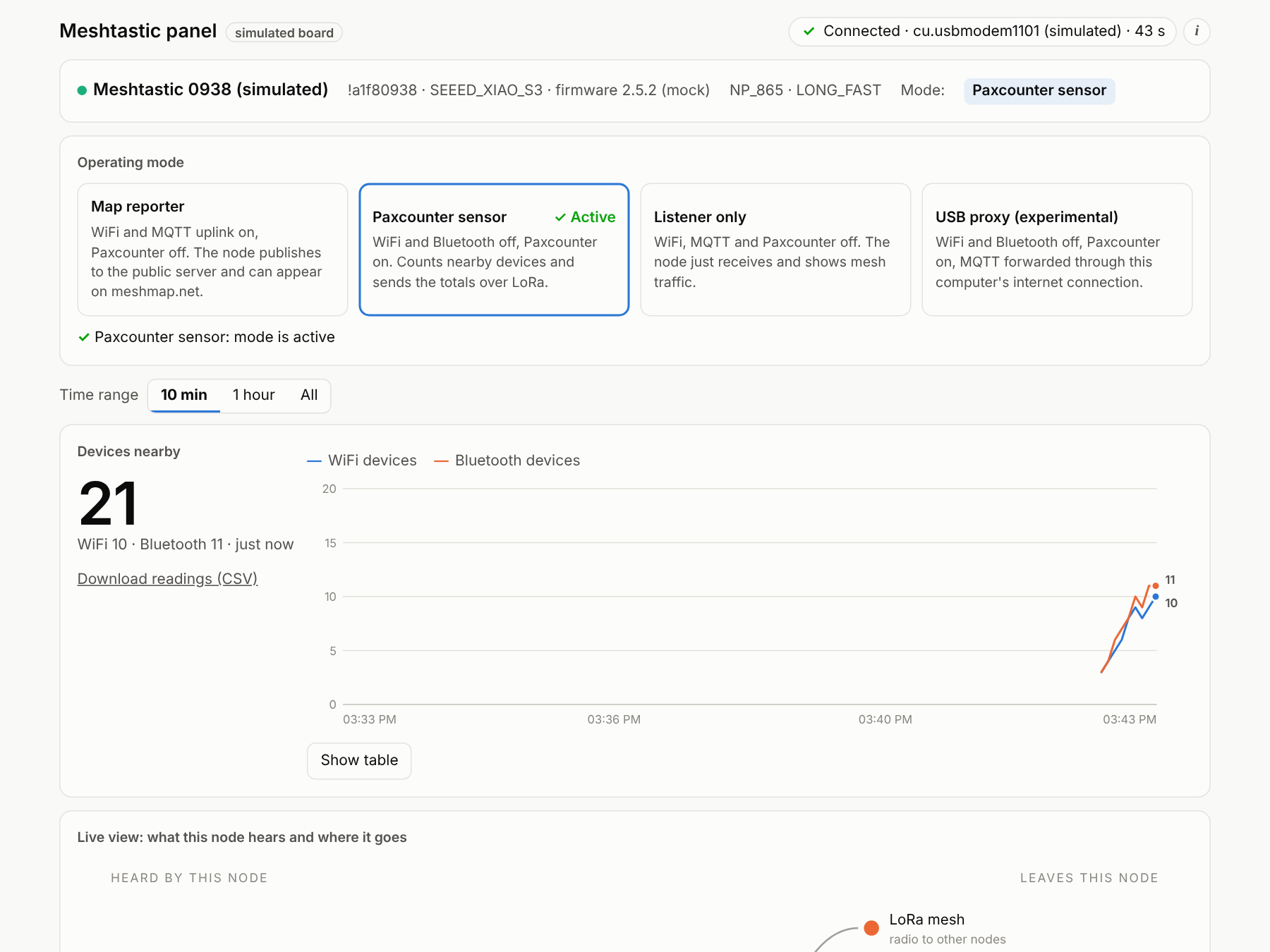 The control panel running against its built-in simulated board.
What is this?
Meshtastic is open-source firmware that turns small, inexpensive LoRa radio boards into a long-range, off-grid mesh network. Nodes pass messages for each other, so no phone signal, WiFi or internet is needed.
This project is a tech demo and an educational experiment with LoRa and sensors for Kathmandu, Nepal. It uses three boards:
| Board | Role in this project |
|---|---|
| Heltec WiFi LoRa 32 V3 | Listener / desk node with a screen |
| Seeed XIAO ESP32S3 + Wio-SX1262 kit ×2 | One map reporter (WiFi → MQTT → meshmap.net), one Paxcounter sensor |
What’s in the repository
| Folder | What it is |
|---|---|
panel/ |
A web control panel that runs on the computer the board is plugged into (Mac, Linux or Raspberry Pi). It switches the board between operating modes and shows a live dashboard: nearby devices (Paxcounter), nodes and signal, packets, battery, channel use and a raw packet log. Optional add-on modules extend it; the first, Messages, lets you read and send channel and direct messages. |
tools/ |
Diagnostic scripts: radio_check.py compares two boards’ radio settings and listens for each other; paxwatch.py prints Paxcounter counts and packet totals in the terminal. |
docs/ |
The guide, published with GitHub Pages: LoRa for WiFi and Bluetooth users, hardware, first setup, Nepal’s NP_865 region, Paxcounter, map reporting, troubleshooting, FAQ and a glossary. |
Quick start
1. Flash and set up a board (5 minutes)
- Open the Meshtastic Web Flasher in Chrome or Edge, pick your board and flash it. Use the same firmware version on every board you want to talk to each other (see Troubleshooting).
- Install the Meshtastic Python CLI:
pip3 install --upgrade "meshtastic[cli]" # macOS: pipx install "meshtastic[cli]" - Set the region for Nepal. The radio stays silent until a region is set:
meshtastic --set lora.region NP_865Everything else (the
LONG_FASTpreset, the default channel and key) can stay at its default. Full details: Getting started.
2. Run the control panel
cd panel
python3 -m venv venv && source venv/bin/activate
pip install -r requirements.txt
python server.py --mock        # try it with a simulated board, no hardware needed
python server.py               # with a real board on USB
Open http://127.0.0.1:8080. Close the Meshtastic web client and any serial monitor first, because only one program can use the USB port at a time. See panel/README.md for running it on a Raspberry Pi and on your network.
3. Check two boards can hear each other
cd tools
python radio_check.py             # run once per board; it compares the saved reports
New to LoRa? The 60-second version for WiFi and Bluetooth users
| WiFi | Bluetooth | LoRa (Meshtastic) | |
|---|---|---|---|
| Typical range | tens of metres | a few metres to tens of metres | 1–10+ km line of sight, hundreds of metres in a city |
| Speed | many Mbit/s | about 1–2 Mbit/s | about 1 kbit/s (short text and sensor data only) |
| Needs a router or phone? | yes (access point) | yes (paired device) | no: every node relays for the others |
| Frequency in Nepal | 2.4 / 5 GHz | 2.4 GHz | 865–868 MHz (NP_865) |
| Power | high | low | very low: days on a small battery |
The longer explainer: LoRa for WiFi and Bluetooth users.
Guide contents
- LoRa for WiFi and Bluetooth users
- Hardware: Heltec V3 and Seeed XIAO ESP32S3
- Getting started: flash, set region, send a message
- Nepal: the NP_865 region and frequencies
- Paxcounter: counting nearby devices
- Putting a node on the public map (MQTT and meshmap.net)
- The control panel
- Troubleshooting
- FAQ · Glossary · Links and related projects
Status and honesty notes
- Tested with a Heltec V3 and two XIAO ESP32S3 boards on firmware 2.5.x in Kathmandu.
- The panel’s simulated board is tested end to end. The real-board parts of the panel (mode switching, USB proxy mode) have had limited hardware testing; please open an issue if something misbehaves.
- This is a community project and is not affiliated with Meshtastic LLC, Heltec or Seeed Studio. Meshtastic® is a registered trademark of Meshtastic LLC.
- Radio rules: Meshtastic’s
NP_865settings follow the Nepal Telecommunications Authority’s Radio Frequency Policy 2080. You are responsible for operating within your local regulations.
Credits and related projects
- Meshtastic: firmware, Python library and CLI, web client, web flasher, protobufs
- meshmap.net by brianshea2
- RadioLib (the LoRa driver inside Meshtastic) and the Semtech SX1262 radio chip
- ESP32-Paxcounter, the original idea behind Meshtastic’s Paxcounter module
- Flask and Eclipse Paho MQTT
- GOSH: Gathering for Open Science Hardware
License
Code: GPL-3.0, matching the Meshtastic Python library it builds on. Guide text and images in docs/: CC BY-SA 4.0.
Contributions are welcome; see CONTRIBUTING.md.