Meshtastic-GOSHkathmandu
The control panel
The control panel is a small Python web app that runs on the computer a Meshtastic board is plugged into. It switches the board between operating modes with one click and shows a live dashboard of what the radio hears. It runs on macOS, Linux and Raspberry Pi, and works offline.
Run it
git clone https://github.com/saadcaffeine/Meshtastic-GOSHkathmandu.git
cd Meshtastic-GOSHkathmandu/panel
python3 -m venv venv && source venv/bin/activate
pip install -r requirements.txt
python server.py --mock     # simulated board, no hardware needed
python server.py            # real board (auto-detects the USB port)
Then open http://127.0.0.1:8080.
| Option | What it does |
|---|---|
--port /dev/cu.usbmodem1101 |
use a specific serial port |
--mock |
simulate a board (good for demos and development) |
--host 0.0.0.0 --token SECRET |
open the panel to your network; changing modes then needs the token |
--web-port 8080 |
the web page’s port |
--modules messages |
which add-on modules to load (none for none) |
Operating modes
| Mode | WiFi | Bluetooth | MQTT | Paxcounter | Use it for |
|---|---|---|---|---|---|
| Map reporter | on | off | on (direct) | off | putting the node on meshmap.net |
| Paxcounter sensor | off | off | off | on | counting nearby devices |
| Listener only | off | – | off | off | quietly watching the mesh |
| USB proxy (experimental) | off | off | via this computer | on | Paxcounter plus MQTT without WiFi on the node |
Changing modes writes the settings and the board reboots; the panel waits for it to come back and confirms the mode. WiFi names and passwords are never changed.
What the dashboard shows
- Connection pill and ⓘ details: the USB port, connected-since time, reconnects, the USB chip, and the board’s model, firmware, MAC address and capabilities.
- Devices nearby: the latest Paxcounter total and a WiFi and Bluetooth chart with a table view and CSV download.
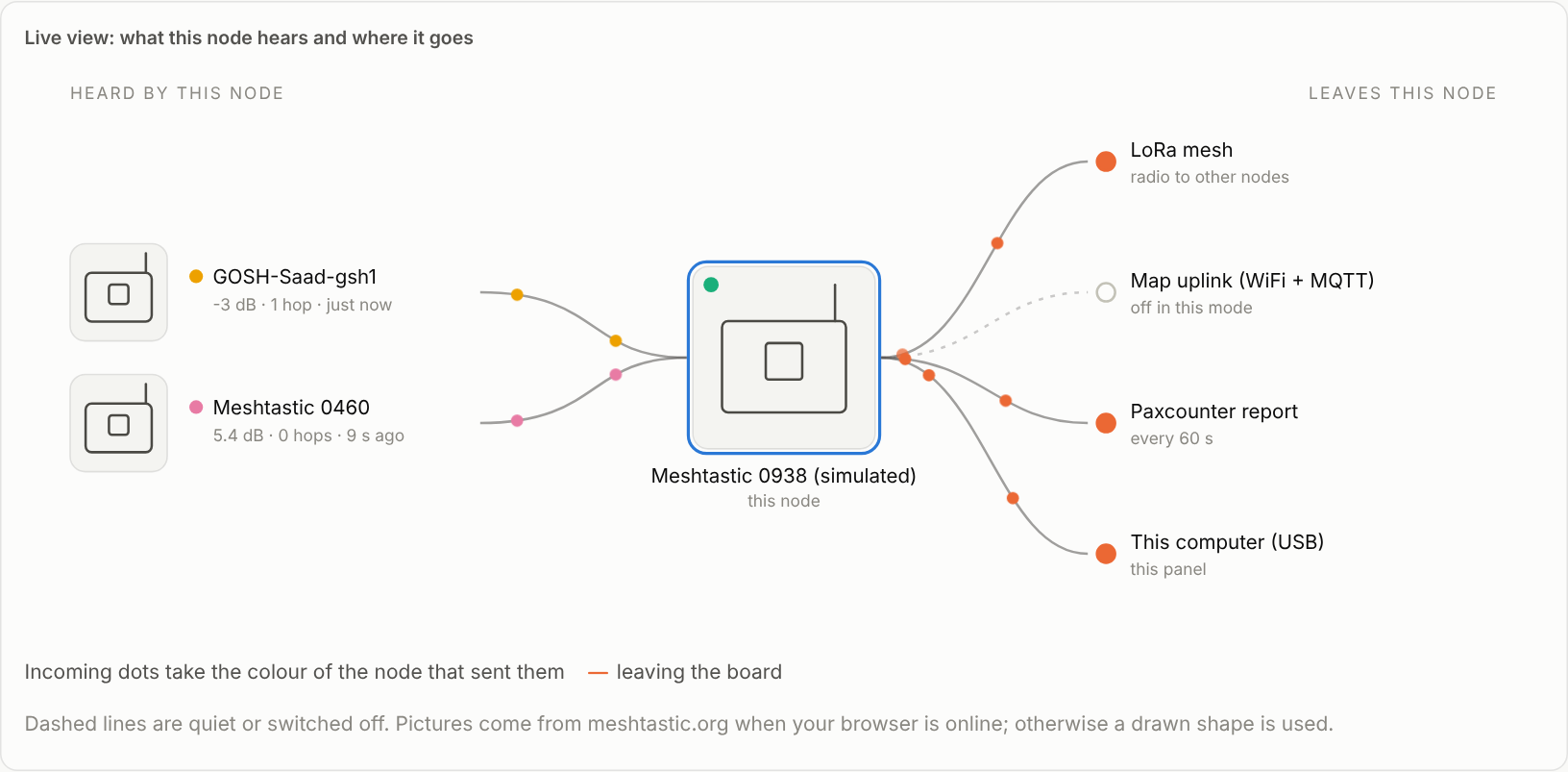
- Live view: nodes heard, your board, and where the data goes (LoRa mesh, map uplink, Paxcounter, USB). Dots move in each node’s own colour.
- Node status: battery, channel busy and airtime gauges, plus WiFi, Bluetooth, MQTT and uplink state.
-
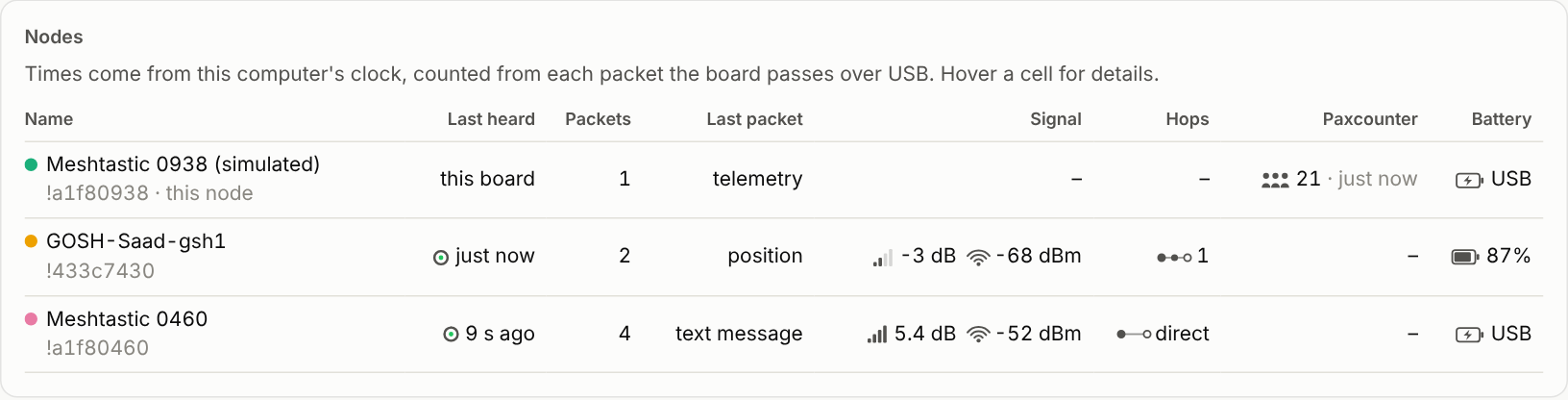
Nodes: last heard (timed by the computer’s clock, because boards without GPS have no reliable clock), packets, last packet type, SNR and RSSI bars, hops, Paxcounter count and battery.
-
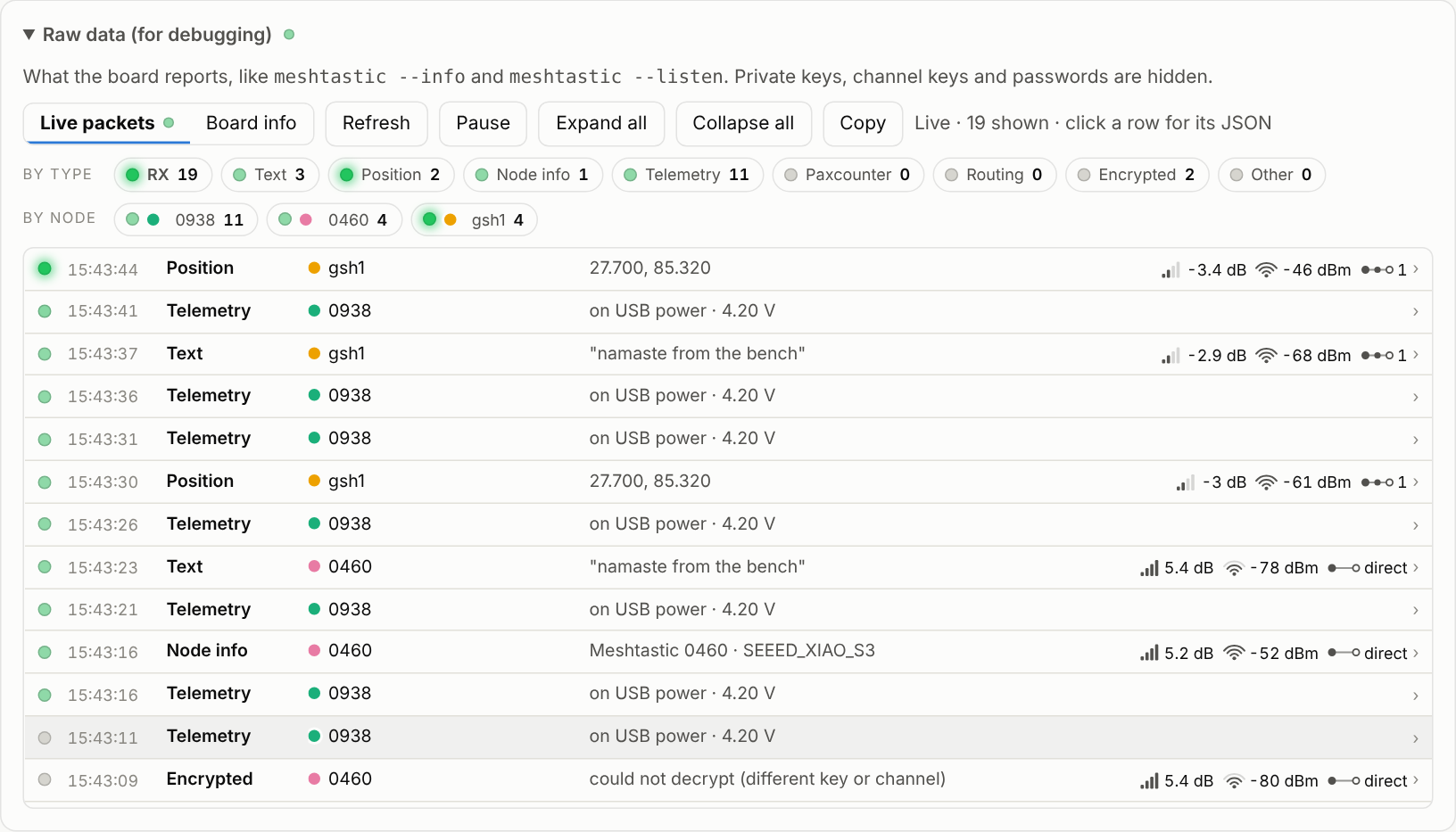
Raw data: live packets with LED activity lights by type and by node, one line per packet that expands to its JSON, plus the full board settings. Private keys, channel keys and passwords are hidden.
Messages (add-on)
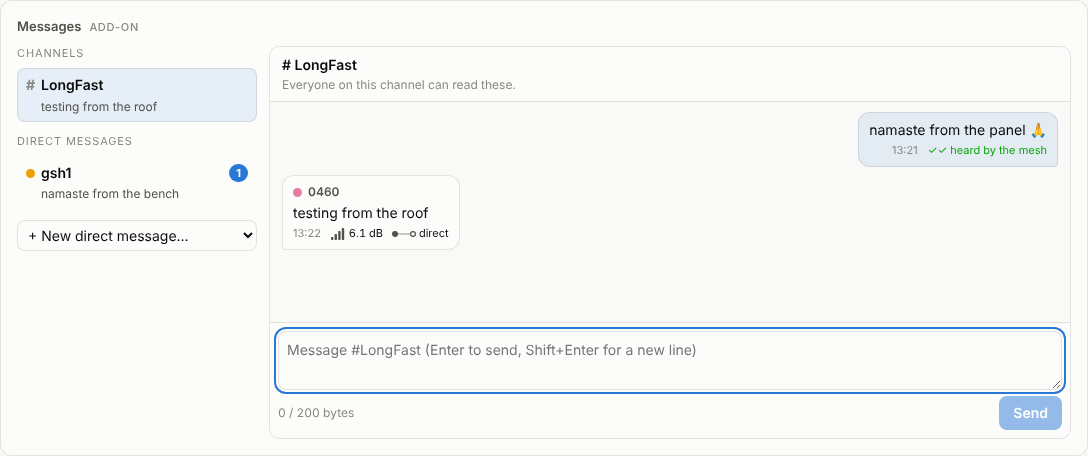
The Messages card works like a simplified Meshtastic app:
- Conversations: channels (for example
#LongFast) and direct messages, with unread counts. Start a direct message with any node from the dropdown. - Messages: incoming bubbles show the sender in their node colour, the time, SNR and hops. Your own messages show their delivery status: sending → sent → heard by the mesh (channel) or delivered (direct), or no answer / not delivered.
- Sending: Enter sends and Shift+Enter starts a new line. A counter keeps you under Meshtastic’s 200-byte limit (emoji and Nepali script take several bytes per character). With
--token, sending needs the token. - History is saved on the computer in
panel/data/messages.jsonl.
Add-on modules
Messages is an add-on module. Modules are optional cards with their own code in panel/modules/<name>/, so new features can be added without touching the core panel:
python server.py --modules messages   # choose modules (comma-separated)
python server.py --modules none       # core panel only
To write one, see the template in panel/modules/README.md. A module can react to every packet, add API endpoints and draw its own card using the panel’s colours and icons.
Reading the indicators
| Icon | Meaning | Rough guide |
|---|---|---|
| ▂▄▆█ bars | SNR, how far the signal is above the noise | above 0 dB is comfortable; LongFast still works to about −15 dB |
| arcs | RSSI, received strength | −40 to −75 dBm strong, −95 to −115 dBm weak |
| ●–●–○ chain | hops, relays in between | “direct” means heard first-hand |
| ring | last heard | empties over 15 minutes |
| half-dial | channel busy / airtime | above 25% channel busy means the mesh is crowded |
How it works
radio.pytalks to the board with the Meshtastic Python library and reconnects automatically after reboots or unplugging.server.pyis a Flask app. It keeps per-node statistics from received packets, logs Paxcounter readings todata/pax_log.csv, and uses paho-mqtt to confirm uplink or forward proxy traffic.static/index.htmlis a single offline page with no build step. Device pictures come from Meshtastic’s web flasher images when online, with drawn shapes as a fallback.
Source: panel/.